 Invoice Creator
Every e-invoice contains a VAT category for each item. With a VAT rate of 19 % or 7 % this is always category “S” (standard rate). For invoices with 0 % VAT the correct category depends on the reason: the service may be not subject to VAT, exempt from VAT, zero rated or subject to the reverse charge – or you are a small business. Until now Invoice Creator also wrote category “S” into the XRechnung at 0 %; validators such as the KoSIT validator reject this (message BR-S-05). Since version 2.10.72 you set the correct category once in the settings.
XRechnung is the German e-invoice format; its settings are available when the program runs in German. The screenshots therefore show the German user interface.
1. Update
Download version 2.10.72 or accept the update the program offers you at startup. Your data and settings are kept. Nothing changes for invoices with 19 % or 7 % VAT.
2. Setting the VAT category for invoices with 0 %
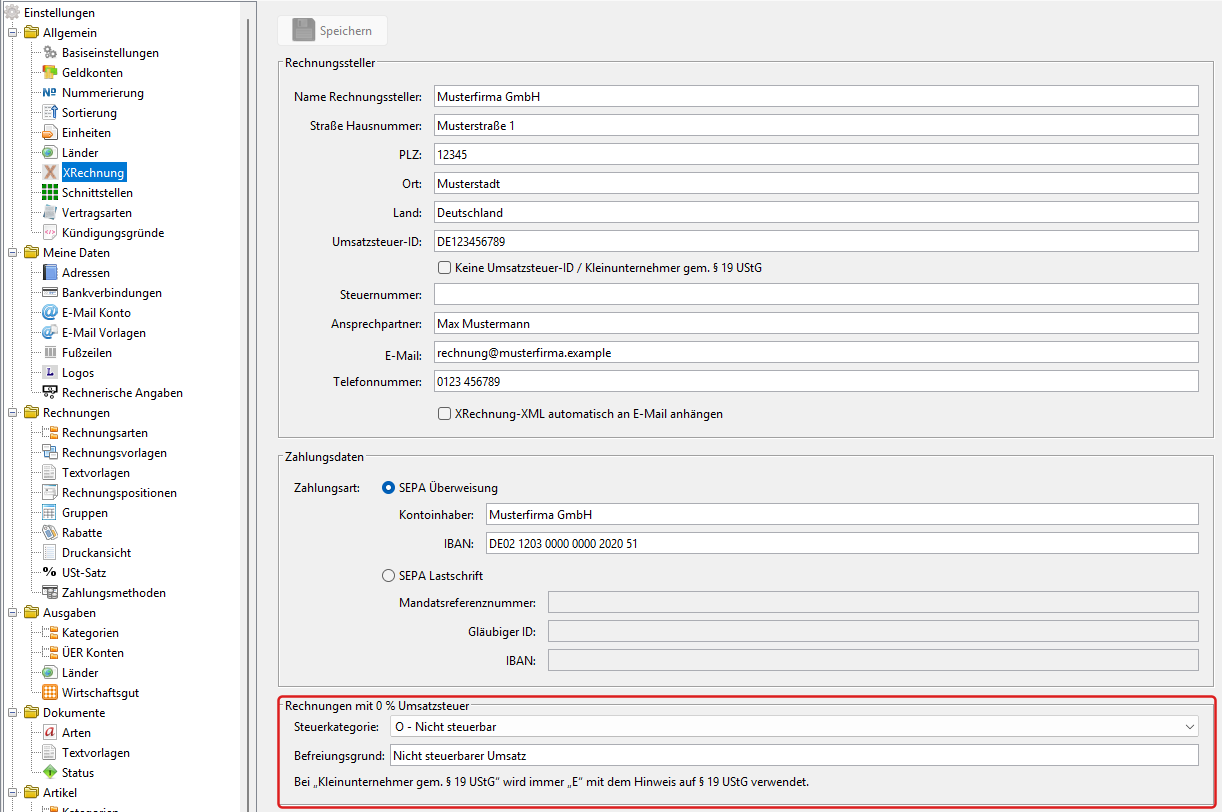
Open Einstellungen → Allgemein → XRechnung (Settings → General → XRechnung). At the bottom you will find the new section “Rechnungen mit 0 % Umsatzsteuer” (invoices with 0 % VAT, marked red in the picture). Choose the VAT category there and click “Speichern” (Save):
- O – Nicht steuerbar (not subject to VAT, default): the service is not subject to German VAT, for example because the place of supply is abroad. In this case the standard does not allow your VAT ID or the customer's VAT ID in the e-invoice; the program leaves them out automatically.
- E – Steuerbefreit (exempt from VAT): the service is exempt, for example under section 4 of the German VAT Act.
- Z – Nullsatz (zero rated): a VAT rate of 0 % applies, for example to photovoltaic systems under section 12 (3) of the German VAT Act.
- AE – reverse charge (section 13b of the German VAT Act): the customer's VAT ID must then be entered in the customer's “E-invoice” tab (see tutorial 14), and your own VAT ID in the XRechnung settings. If one of them is missing, the program tells you when you create the XRechnung.
3. Exemption reason
For categories O, E and AE the standard requires an exemption reason in the invoice. When you change the category, the program fills in a suitable standard text, for example “Nicht steuerbarer Umsatz” (not subject to VAT). You can overwrite it, for instance with the exact provision under which your service is exempt. Zero rated (Z) has no exemption reason; the field is locked then.

4. Small businesses
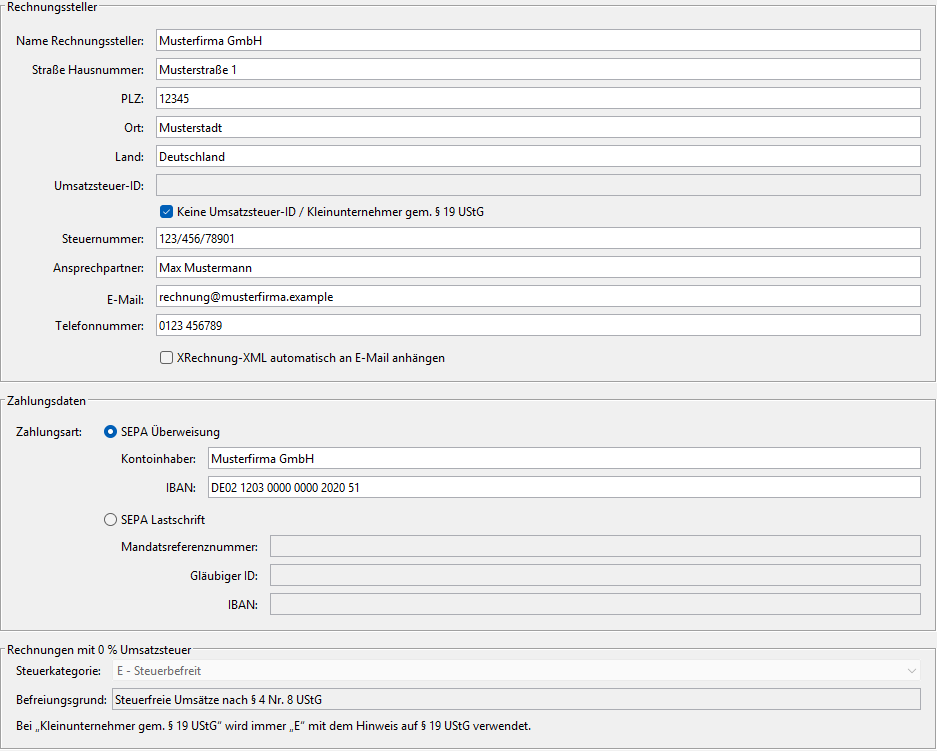
If the box “Keine Umsatzsteuer-ID / Kleinunternehmer gem. § 19 UStG” (no VAT ID / small business under section 19 of the German VAT Act) is ticked, the program always uses category “E” at 0 % together with the required note on section 19. The selection in the 0 % section is locked then. As a small business you enter your tax number (Steuernummer) – it is mandatory then, because the invoice contains no VAT ID.
5. VAT ID or tax number is sufficient
Until now the program required both the VAT ID and the tax number for the XRechnung. Since 2.10.72 one of them is sufficient, as the German VAT Act also provides for invoices. The tax number only appears in the XRechnung if you have entered it.
6. Cash payment
If “Bar” (cash) is selected as the payment method of the invoice, the XRechnung now contains the payment type “cash” (code 10) without bank details. Until now the payment type from the XRechnung settings (SEPA credit transfer or SEPA direct debit) was always used.
7. ZUGFeRD invoices (PDF)
ZUGFeRD invoices also use the selected category at 0 % – as soon as you have saved the 0 % section once or ticked the small business box. Without this setting the previous category “Z” (zero rated) is kept. We checked all variants with the Mustang validator (XRechnung 3.0, EN 16931).
Note: Which category applies to your services is a tax question. If in doubt, ask your tax advisor.
Questions and feedback are welcome in the forum or via a support ticket.
Comments
There are no comments yet.