 Invoice Creator
Since version 2.10.65 the Invoice Creator produces ZUGFeRD invoices in the current format ZUGFeRD 2.x / Factur-X with the EN 16931 profile. Up to version 2.10.64 the old ZUGFeRD 1.0 format (COMFORT profile) was used, which many recipients and validation tools no longer accept. This tutorial explains what has changed and how you can check a generated invoice.
1. What is ZUGFeRD 2.x / Factur-X?
ZUGFeRD is a hybrid invoice format: the invoice is a normal PDF file that the recipient can read and print, and it additionally contains an embedded XML file with all invoice data for automatic processing. Since version 2, ZUGFeRD is identical to the French standard Factur-X; the embedded file is called factur-x.xml. The EN 16931 profile corresponds to the European standard for electronic invoices and is therefore also the basis for the mandatory e-invoicing between businesses in Germany. The PDF file is created as PDF/A‑3, a long-term archiving format in which all fonts are embedded in the file.
2. Settings
The setting is unchanged: “Settings → Interfaces”, tick “Complete all invoices with ZUGFeRD information” and enter your company details below (organization, street, postal code, city, country as a two-letter code such as “DE”, tax number, VAT number). If you have also entered a contact person with e-mail and phone under the XRechnung settings, these details are included in the XML as the seller's contact.
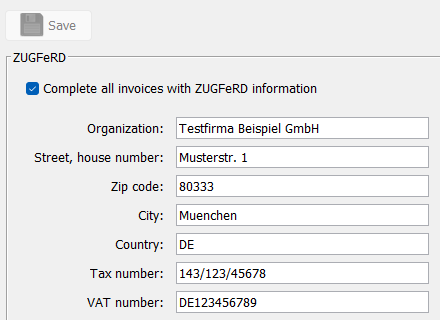
The bank details of the invoice (IBAN, BIC, account holder), the customer's address, customer number and e-mail address, the delivery date, the due date and the payment text are taken from the invoice automatically. The invoice lines go into the XML with net price, quantity and unit; the units are translated into the standardized codes (for example hours → HUR, pieces → C62), exactly as for the XRechnung.
3. What is inside the PDF file
Open a generated invoice in a PDF program that shows attachments (for example Adobe Acrobat Reader via the paper clip icon): there you will find the file factur-x.xml. The document properties show “PDF/A‑3” as the standard and “EN 16931” as the Factur-X profile. If you want to check the file automatically, you can use one of the free online validators for ZUGFeRD/Factur-X; the invoices of the Invoice Creator are recognized there as valid EN 16931 invoices with valid PDF/A‑3.
4. Notes
For automatic processing the details must be complete, above all the VAT number or tax number of the seller and the complete address of the customer including the country. If something is missing, the program still creates the XML, but a strict recipient may reject the invoice. If the ZUGFeRD file cannot be embedded, the invoice is created as a normal PDF file as since version 2.10.64 and you get a notice.
If a public authority requires a pure XML invoice, continue to use the XRechnung (button “Save as XRechnung” or the automatic e-mail attachment, see Tutorial 9). The ZUGFeRD PDF, on the other hand, is the right format for business customers who should receive both a readable invoice and the data for automatic booking.
Comments
There are no comments yet.